
Skip to content
IT Leader Company Logo
  • Services

    Overview

    Find every technology solution your organisation needs under one roof – with simplified, per-user pricing for all managed services.

    Learn More
    • IT Support
    • Managed Backup Solutions
    • Managed Firewall
    • Cloud
    • Cloud Migration
    • MS 365 Solutions
    • MS 365 Signature Management
    • MS 365 Migrations
    • Cyber Security
    • Cyber Security Audit
    • Cyber Awareness Training
    • Email Security
    • Endpoint Security
    • Essential Eight
    • UC / Voice
    • PBX
    • MS 365 Teams
    • Internet
    • NBN
    • IT Consulting
  • Industries

    Overview

    IT isn’t one-size-fits-all. Learn how our industry-specific expertise can help deliver the right outcomes for your organisation.

    Learn More
    • Manufacturing
    • Professional Services
    • Transportation
  • Resources
    • Blog
    • Knowledge Centre
  • About
    • About Us
    • Technical Capability Summary
    • Careers
  • Support
    • Support Options
    • Remote Support
    • New User Form
    • Exit User Form
  • Get In Touch
Get In Touch

Home - Managed Services - Not All E-mail Is Equal: How Old Is Your Email Technology?

Not All E-mail Is Equal: How Old Is Your Email Technology?

ITL Logo Icon

Written By

IT Leaders

Table of contents

Table of contents

A disturbingly large portion of the business world still uses antiquated email technology.

Email may seem like it has not changed in over 30 years; however, there have been leaps and bounds in not only functionality and security but also ease of use.

POP (Post office protocol) mail downloads your email to your local PC, it does not synchronise across your devices readily, uses insecure connections which are susceptible to being hacked and passwords intercepted, in most instances, there are NO backups. If your PC dies, your historical email goes with it, as only the most recent emails are stored on a server.

IMAP (Internet Message Access Protocol) is a slight improvement over POP as it allows syncing mail across devices and stores your mail on the server in case of device failure. However, you still cannot sync contacts, calendars or sent items, in most instances, there are NO backups, a loss of server will result in a loss of mail across ALL devices.
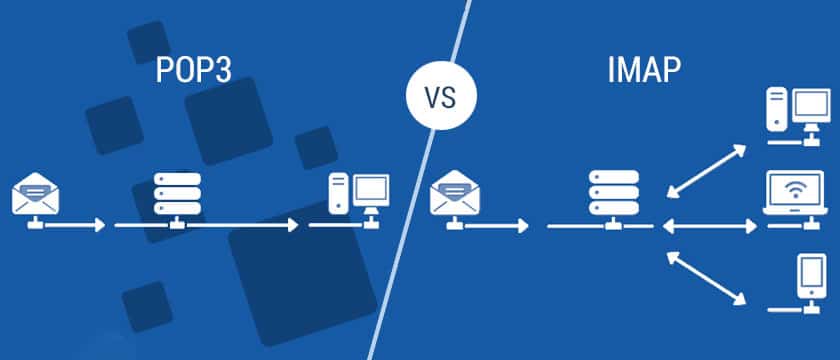
pop email vs imap email

By the mid-2000s, Microsoft Exchange was gaining popularity in the business world. It allowed full synchronisation for mail, contacts, calendars, notes and sent items – across various devices. In most cases backups DID exist, however both the mail servers and backups were very expensive to deploy and maintain.

Google Mail (Gmail) revolutionised what webmail could be, introducing the concept to the general public and over time, opened the door for mainstream acceptance of cloud-based services.

Microsoft has improved upon this over the years and has now made enterprise quality exchange email available on the cloud, this takes all the cost of infrastructure off the end user and makes enterprise level email systems available to everyone at very affordable prices.

With Microsoft 365, security and resiliency are front & centre. Data encryption is switched ON by default, Multi-Factor Authentication is easy to switch on and operate & there is very good built-in anti-spam, anti-phishing and anti-hacking functionality.

The ability to sign in from any device that has an internet connection and access your mail and data grants you the ability to pick up and keep running even in cases of power or internet outages in your office – all without the sometimes annoying or complicated setup processes involved in configuring POP or IMAP connections.

Microsoft 365 also allows you to bundle your licensing for Microsoft & Windows into the single sign in and keep you up to date at all times, rather than purchasing the latest Microsoft or Windows suite every few years.

View our Microsoft 365 migration pathways.

Related Articles

View All Posts
Loading...
Cyber Security
Top Malware Warning Signs To Watch Out For - IT Leaders

Top Malware Warning Signs To Watch Out For

Recognising Malware Infections on Your Computer & IT Networks It usually takes at least a week for businesses to regain...
Cyber Security
protect against cyber crime and malware

Online Threats – Get Your Business Prepared & Protected Today!

Dealing with Online Threats - Your guide to 9 types of malware you should know about... Gone are the days...
Cyber Security
Keep-your-business-safe

This is the ultimate key to keeping your organisation’s data safe

As business IT professionals, we’ve seen some things. Things that will horrify you. Things you would never want to encounter...

Make the Switch

Talk to us to find out how changing IT providers could give your business the competitive edge it needs.
IT Leader Company Logo
  • service@itleaders.com.au
  • 1300 596 560
  • 07 5628 3260
  • 3/42 Lawrence Drive, Nerang QLD 4211
  • 8:30 am to 5 pm AEST, Monday to Friday
Linkedin-in Facebook-f

Services

  • Managed IT Services
  • Cloud Solutions and Infrastructure
  • Cyber Security and Compliance
  • Unified Communications and VoIP
  • Business Internet and Network Services
  • IT Consulting and Digital Transformation

Industries

  • Manufacturing
  • Professional Services
  • Transportation

Our Company

  • About Us
  • Technical Capability Summary
  • Careers
  • Contact Us

Resources

  • Blog
  • Knowledge Centre

Support

  • Remote Support
  • New User Form
  • Exit User Form
  • Support Options
  • © 2026 IT Leaders
  • Privacy Policy
  • Terms of Service
  • Terms of Use